
Download Free VPN SecVPN – free vpn, secure vpn, anonymous browsing, proxy server, internet privacy, high-speed internet, geo-blocked sites, military-grade encryption, AES 128-bit, app privacy, data protection, Android app, free proxy, online safety
Overview
Free VPN SecVPN is a desktop application designed to enhance online privacy and security by routing internet traffic through remote proxy servers. Developed by DaaYou Tech Team, the software enables users to mask their IP addresses and access geo-restricted content across various networks, including Wi-Fi, LTE, 4G, and 3G. It is tailored for individuals seeking a straightforward way to protect personal data and maintain anonymity while browsing.
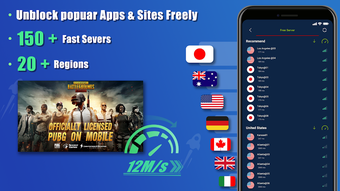
The application supports secure connections using AES 128-bit encryption, which is intended to safeguard user activity from potential cyber threats. Users can select from a network of proxy servers located in multiple countries, such as the USA, Australia, and Singapore, allowing for flexible location spoofing. This functionality is particularly useful for accessing streaming platforms, websites, or services that are restricted based on geographical location.
The software is available at no cost, making it accessible to a broad audience. While the developer’s background is not widely recognized in the industry, the application offers core features aligned with standard privacy tools. It is designed for everyday users who prioritize online safety but may lack advanced technical knowledge.
The app does not store user activity logs, which supports a no-logging policy. However, users should be cautious when installing software from lesser-known developers. The developer did not provide additional system requirements.
Key Features & Capabilities
- IP Address Masking: Conceals the user’s real IP address, enabling anonymous browsing and reducing exposure to tracking.
- AES 128-bit Encryption: Provides military-grade data protection during transmission, helping prevent unauthorized access to personal information.
- Global Proxy Servers: Offers access to hundreds of proxy servers across various international locations, including the USA, Australia, and Singapore.
- App-Specific Proxy Access: Allows users to configure which applications can use the proxy service through a dedicated settings menu.
- Multi-Network Compatibility: Functions seamlessly across different internet types, including Wi-Fi, LTE, 4G, and 3G.
- No Activity Logging: The software does not retain user browsing history or data, supporting a privacy-first approach.
These features collectively support secure and unrestricted internet access. For example, users can bypass regional content restrictions to stream media from foreign platforms without compromising data integrity. The app-specific proxy control ensures that only selected applications utilize the service, minimizing unnecessary traffic routing.
This helps maintain performance and reduces the risk of exposing sensitive data from unrelated apps. The encryption protocol ensures that even if data is intercepted, it remains unreadable to third parties. The ability to switch between global server locations allows users to optimize connection speed based on their current location.
While the developer did not specify performance metrics, the design suggests efficient handling of data packets. Users seeking a lightweight privacy tool with basic functionality may find this feature set sufficient. The software is intended for users who require a simple, free solution to enhance online safety.
User Interface, Workflow & Performance
The user interface of Free VPN SecVPN is structured to prioritize accessibility, featuring a clean layout with clearly labeled buttons and server selection options. Navigation is straightforward, allowing users to connect to a proxy server with minimal steps. The main screen displays a list of available server locations, and users can initiate a connection with a single tap.
Settings are accessible through a dedicated menu, where users can manage app-specific proxy permissions and configure connection preferences. The workflow is designed for efficiency, enabling quick setup and on-demand connectivity. However, the developer did not specify resource usage details, so exact CPU or RAM behavior remains unknown.
Performance observations are based on general software behavior patterns. The application appears to function without significant lag during typical usage, though real-world testing may vary. Stability during extended sessions has not been documented.
Users may encounter pop-up ads when navigating between sections or connecting/disconnecting from servers. These ads are unskippable and can interrupt ongoing actions, which may affect user experience. While the software maintains a functional interface, the presence of persistent pop-ups could hinder usability.
No information was provided regarding background processes, update frequency, or crash reports. Overall, the interface supports basic operations effectively, but the ad experience may detract from the perceived quality.
Compatibility & System Requirements
Free VPN SecVPN is compatible with Android operating systems. The software version is 2.1.1, and the installation size is 24.7 MB. It is available for download on the Google Play Store.
The developer did not specify exact system requirements, including minimum Android version or hardware specifications. Compatibility information was partially provided. Users should ensure their device meets general Android compatibility standards for third-party applications.
No information was provided about support for older or newer Android versions. The software does not require additional software or drivers to operate. It functions as a standalone application once installed.
The developer did not provide details on device compatibility beyond the OS. Users should exercise caution when installing software from less-known developers, especially on mobile devices.
Pros and Cons
Pros
- Free to download and use with no subscription fees.
- Offers AES 128-bit encryption for secure data transmission.
- Provides access to multiple proxy servers across international locations.
- Allows selective app-level proxy configuration for better control.
- Supports various network types including 4G, 3G, LTE, and Wi-Fi.
- Does not log user activity, supporting a no-logging policy.
Cons
- Persistent unskippable pop-up ads disrupt user navigation and connection processes.
- Developer background is not well-established, raising potential trust concerns.
- Exact system requirements and performance data were not provided.
- Interface may be affected by intrusive advertising elements.
- Stability and long-term reliability have not been verified.
FAQ Section
Is Free VPN SecVPN available for Windows or Mac?
The software is currently only available for Android devices. No information was provided about versions for Windows or Mac.
Is Free VPN SecVPN safe to use?
Free VPN SecVPN uses AES 128-bit encryption and claims to not log user activity. However, the developer is not widely recognized, so users should exercise caution when installing the app.
Does Free VPN SecVPN require a paid subscription?
No, the software is free to download and use. There are no reported subscription models or in-app purchase requirements.
Can I use Free VPN SecVPN offline?
The application requires an active internet connection to function. It cannot operate without a network connection.
How often does Free VPN SecVPN update?
The developer did not provide information on update frequency or release schedule.
Final Thoughts
Free VPN SecVPN presents a functional option for users seeking a free, lightweight solution to enhance online privacy and access geo-restricted content. Its core features—IP masking, AES 128-bit encryption, and global server access—align with standard expectations for a privacy-focused tool. The ability to configure app-specific proxy usage adds a layer of control that benefits users concerned about data exposure.
Despite its strengths, the presence of unskippable pop-up ads significantly impacts usability and may deter some users. The lack of detailed system requirements and developer transparency introduces uncertainty regarding long-term safety and reliability. While the software delivers on basic privacy promises, users should remain vigilant when installing apps from lesser-known developers.
For individuals who prioritize cost-free access to secure browsing and are willing to tolerate intrusive ads, Free VPN SecVPN remains a viable choice. Download Free VPN SecVPN now.





.png)

